How to Change Your Twitter Profile Header Image
- How To Get Twitter Followers – Tips And Tricks
- Auto Publish Your Twitter Tweets As WordPress Posts
- How To Add Twitter Follow Box In Blogger Or WordPress Blog
- Go to Twitter Design Page.
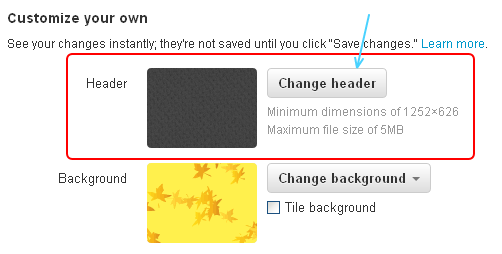
- Under Customize Your Own Click On “Change Header” Button.(As Shown In Image)
- After Upload an Image, You Can Move and Scale It As You Want.
- How To Boost Your Sales Online With Twitter
- How Many Of Your Twitter Followers Are Fake?
- Add Official Twitter Follow Button To Blogger Blog
|
Did you Like this article?
|
Get FREE Updates
Get Freebies, updates and Special offers straight into your inbox. |
|
|
Tweet |
You May Like To Read:Note: Worth Reading:Read Also – How To: Disable Twitter Email NotificationsAuthor – twitter account