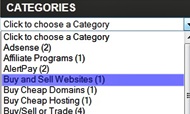
Customization:
- How To Add Bricks Style Labels To Blogger / Style2
- How To Show Recent Post Titles By Labels In Blogger Blog
- Go to Dashboard > Template > Back Up Your Template
- Edit HTML > Proceed
- Make Sure You DO NOT Tick The Expand Widget Templates Checkbox
- Press (Ctrl+F) & Find Given Below Code.
- Replace Above Line With Given Code.
- Save Template & Its Done
- Change the width of the widget by changing 100% to any percentage, or pixel (px).
- You can change “Click To Choose A Label” with your own title.
<b:widget id=’Label1′ locked=’false’ title=’Labels’ type=’Label’/>
<b:widget id=’Label1′ locked=’false’ title=’Labels’ type=’Label’>
<b:includable id=’main’>
<b:if cond=’data:title’>
<h2><data:title/></h2>
</b:if>
<div class=’widget-content’>
<select style=’width:100%‘ onchange=’location=this.options[this.selectedIndex].value;’>
<option>Click To Choose A Label</option>
<b:loop values=’data:labels’ var=’label’>
<option expr:value=’data:label.url’><data:label.name/>
(<data:label.count/>)
</option>
</b:loop>
</select>
<b:include name=’quickedit’/>
</div>
</b:includable>
</b:widget>
Worth Reading:Note: Author – Blogger Blog