
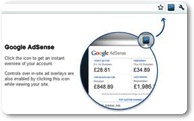
Screenshot Of Google Publisher Toolbar Extension
There Are Two Ways To See Your AdSense Revenue:
How to Install Google Publisher Toolbar On Chrome
New Feature Added In 3.x:
- Go to “AdSense Publisher Toolbar”
- Click On The Tab Showing “ADD TO CHROME” and enjoy your AdSense Ads revenue in any web page without going to the AdSense Account.
“AdSense Publisher Toolbar”1.Pop-up account overview lets you view the following at a glance: 2.In-site ad overlay gives you the following options right in your site:The Google Publisher Toolbar gives AdSense publishers two easy ways to access real-time information about their accounts and the ads served on their websites.Suppose, you have multiple and you logged in with a user which is different from your AdSense account then “Access required” message will appear for allowing the chrome extension ‘Google AdSense’ access to your .
.jpg)
1.jpg)