Add Your Google + Profile Link Anywhere On Your Blog Sidebar Using The Following CodeHow To Show Author Profile Picture Correctly?
Here Is Demo Of About Us Page Profile
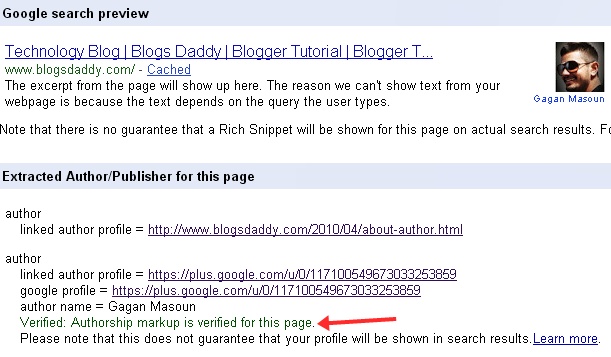
Test Your Profile With Rich Snippets Testing Tool
- Replace Google Plus Profile Link With Your Profile Link. Here Is My Profile Link – http://plus.google.com/117100549673033253859
- You Can Replace Join Me On Google+ With Any Text You Like (Optional)
- Now, Add A Link To Your About Us Page Just Below Your Blog Footer or Anywhere You Like. I Have Added This Link To My Blog Footer Using The Following Code:
- Now The Most Important Part. Inside Your About Page Upload Your Profile Photo With Dimensions 128px by 128px in size and using JPEG format. Also Start The First Line Of The Paragraph With Your Google Plus Profile Link Using The Following Code:
- One Final step is to Upload a quality Profile Pic of yourself on Google Plus. Your image will look best if it is 150px by 150px in size or you can use the same 128px by 128px size profile pic that you added to your blog about page.
- Go to http://profiles.google.com/me/plusones
- Click Edit Profile
- Check The Show This Tab On My Profile Checkbox.
<a href=“Google Plus profile Link“ rel=”author” target=”_blank”> Join me on Google+</a>
<a rel=”author” href=”
http://www.blogsdaddy.com/2010/04/about-author.html”>About Me</a>
<a rel=”me” href=https://plus.google.com/117100549673033253859 title=”Gagan Masoun”>Gagan Masoun</a>
BlogsDaddyGagan MasounDemo HeretitleGoogle+ profile linkGagan“Edit Profile”“LINKS”“Verified: Authorship markup is verified for this page”Visit rich snippets toolHow To Get Google Verified Authorship For Your Blogger/Wordpress Blogyou will see the picture of BD founder in the results like the screenshot below:rel=”me”