1. Have A Look At The Numbers On Impressions
2. Monitor Your Website For Potential Problems
3. Send A robots.txt File
4. Submit A Sitemap
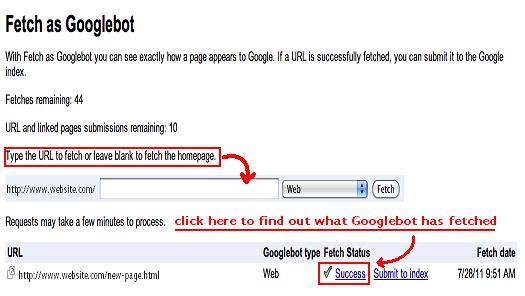
5. Use “Fetch as Googlebot”
6. Check Your Messages
7. Submit Your Website Again
8. Explore More Features
9. Set Your Target Location and Chosen Domain
CONCLUSION
- Why should a website rank for Google search results?
- Why focus on Google’s SERP ranking when there are plenty of other search engines?
- Why concentrate on Google?
- Find out how Google indexes your website content
- Diagnose possible problems that the algorithms may meet when accessing your site
- Come up with ideal optimization techniques for better ranking
- Keywords – most prevalent search terms on your website
- Links to your site – other sites linking to you
- Internal links – amount of links pointing to a certain page on your site
- Search queries – key phrases or keywords the users are typing in to access your website
- View its status
- Check out updates
- Find out the number of URLs you have sent through it
- Know its errors by clicking on “details” to receive alerts
Share this PostAs of 2 June 2012,66.85%243.6 233.6 million“Your site on the web”.
50,000 URLsSERPs“Site Configuration”About the Author:Smart Traffic SEO marketingLooking into these statistics, you already know the answer to common questions like the following:“Settings”