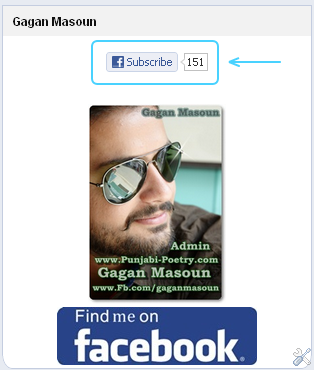
Demo Screenshot: Subscribe Button For Blogger Blog
How to Add Facebook “Subscribe” Button To Blogger Blog
- Go to Facebook Developer Subscribe Plugin Page
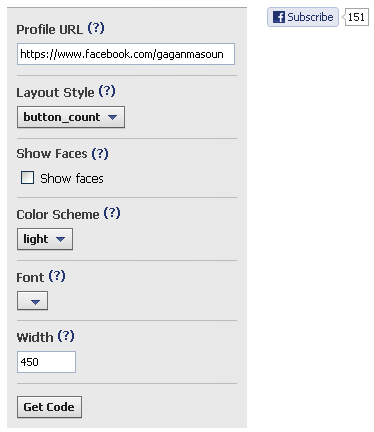
- Write Your Profile URL, Example: https://www.facebook.com/gaganmasoun
- Now Customize Your “Subscribe” Button: Layout Style, Show Faces, Color Scheme, Font, Width
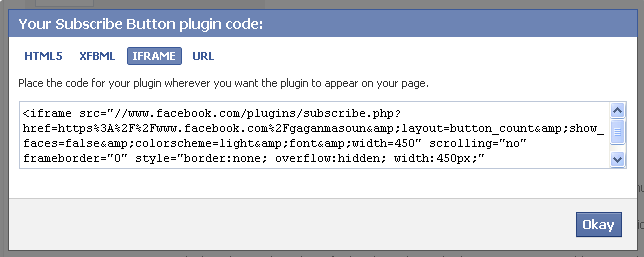
- Click On “Get Code” and Copy It. As you can see there’s 4 options of the codes (HTML5, XFBML, IFRAME and URL) Then if you use Blogger platform you can choose IFRAME.
- Now, Go to Blogger Dashboard > Layout > Add a Gadget. Then Choose HTML/JavaScript widget & simply paste the code in the box:
- Re-position the widget on your sidebar as you wanted, and “Save” it
- Its All Done, Enjoy Blogging.
|
Did you Like this article?
|
Get FREE Updates
Get Freebies, updates and Special offers straight into your inbox. |
|
|
Tweet |
You May Like To Read:See Also: Add Custom Facebook Like Button To Your Blogger BlogSee Also: How To Delete Facebook Timeline?Read Also: Customize Facebook Chat – Change Font Size And Add SmileysAuthor – Likepublic pagecreate onepersonal profileFacebookFacebook: Some Interesting Things You Must KnowAdd JQuery Pop-Up Facebook Like Box To BloggerAdd Pop-Up Facebook Like Box With Twitter ButtonAdd Official Facebook Recommendations Bar Widget To Blogger