
Many of what used to be possible only possible via editing the template now can be done via the DESIGN (previously called LAYOUT) and in the Blog posts section, clicking EDIT will take you to “Configure blog posts” options:

Now when you click Edit, you will be presented with a popup with options to change many of Blogger’s default settings (see screen shot below):
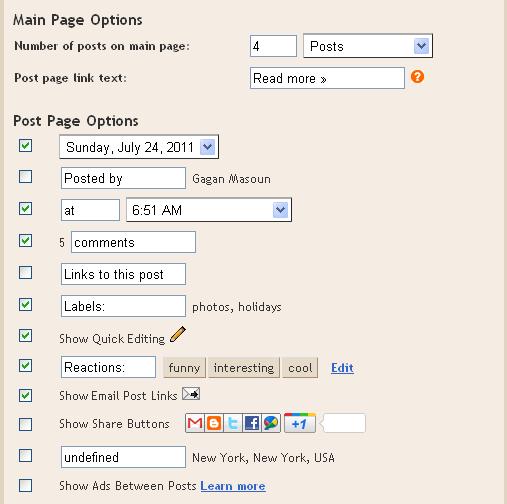
The following are what you can change (options you can change plus Blogger defaults in brackets):
Main Page Options:
Number of posts on main page” [ 7 ] [ Posts ]
Post page link text (expandable post summary): [ Read more]
Post Page Options (tick v to display and remove tick v to hide, text you can change in blue):
[ v ] [ Sunday,July 24, 2011 ]
[ v ] [ Posted by ] Gagan Masoun
[ v ] [ at ] [ 6.51am ]
[ v ] 5 [ comments ]
[ ] [ Links to this posts ]
[ v ] [ Labels: ] photos, vacation

[ ] [ Reactions: ] funny interesting cool {Edit}


[ ] Show Ads Between Posts
|
|
Note : You will find a confirmation link in your inbox or junk folderIf You Enjoyed This Post Please Take 5 Seconds To Share It.