
 You should have your own custom domain (eg:yourblog.com). If you're using Blogger platform then its important because Blogger can disable/delete your blog at anytime without giving you any notice. This tutorial will hopefully explain the benefits of getting your own web domain and where to start.
If you're using Blogpost hosted blog then you're promoting Google's brand. So, better to have your own URL to promote your outstanding brand. Search engines like: Google, Yahoo and Bing love domains more than sub-domains. Domain names are available on very cheap at only $3.96 a month with HostGator.
Choosing The Right Web Host
If you are finding safe and fast servers web hosting company, use HostGator. My high traffic websites have been running without any issue since April of 2010 and HostGator can examine them well.

Setup Custom Domain With Blogger
Step# 1 Ask your web hosting provide that you want to register a new domain name such as Example.com. Go to the control panel on your domain registrar’s website, and locate your DNS settings. Follow the instructions below to enter your "CNAME". Please not it may take a few hours to day for DNS settings to update correctly.
Step#2 Go to Blogger Dashboard >> Settings Tab >> Publishing Tab >> Click “Add Custom Domain”

Step# 3 Now In The “Advanced Settings” Enter Your New Domain Name URL (eg: www.blogsdaddy.com).

Step# 4 Click “Save” button. Then blogger display this error “We have not been able to verify your authority to this domain. Error 12. Please follow the settings instructions.”
Step# 5 Click “settings instructions”. If you click this link before that error (above), you can’t configure CNAME correctly.
Step# 6 You'll be redirected to the “How do I use a custom domain name for my blog?” page.
Step# 7 Now, Choose the “On a top-level domain (www.example.com).” option.

Step# 8 You should see something similar to the image below.

Pay attention to a pair of two codes highlighted in the screenshot. Those are your domain ownership token. In my example the codes are “HX7TEKRO4SCN" and “gv-VUFBH2BJB64B2WJMMD7YLUBDZOX7KWL4IFCADFSHI5MRBNJ5ESFQ.domainverify.googlehosted.com.”. Your token will be different.
Change DNS Settings
Step# 1. Go To Google Apps : https://www.google.com/a/
Step# 2. On the Google apps home page right top side you will see the log in option:
Enter Your Domain Name -> Go to Domain Management (Select From Drop Down Menu) -> Click On Go Button
Step# 3. Enter your username and password - This is the username associated with your Domain.You got a free Email account with your domain name this is the username.

Click "Domain Settings" -> "Domain Names" -> "Advanced DNS Settings" As Shown Below In Screenshot:
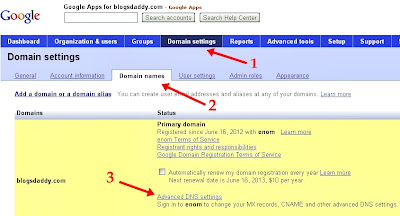
Copy the Password and Click "Sign in to DNS console" then sign in your domain management with those details. (Enter domain name and password for login)
See screenshot given below :


Step# 7 Add a CNAME.
- For Host Name/Name/Label or Host” field, enter “www” without quotes and
- For Address/Destination/Target or Points To field, enter “ghs.google.com” without the quotes.
- In the Host Name field, paste the first code you get in step 2.3, ex: HX7TEKRO4SCN.
- In the Destination field, paste the second code, ex: “HX7TEKRO4SCN" and “gv-VUFBH2BJB64B2WJMMD7YLUBDZOX7KWL4IFCADFSHI5MRBNJ5ESFQ.domainverify.googlehosted.com.”.
Step# 9 Now we should add “A-records”. If you already have “A-records” modify them. If you don’t have them click “Add” button.
Step# 10 You have to add 4 separate “A-records” , pointing to the following Google IP addresses:
- 216.239.32.21
- 216.239.34.21
- 216.239.36.21
- 216.239.38.21
Update Your Blogger Settings
Step# 1 Go To Blogger Dashboard >> Settings > Basic > Publishing >> Again Enter Your Custom Domain Name With “www”.Step# 2 Ticks “redirect” option.
Step# 3 Click “Save” button. If it again displays “Unable to verify authority….” Error wait for a few hours to update your DNS settings and again try it.
Step# 4 That’s, now your blog has a custom domain name.
Need Help?
Feel free to ask me any question because I'd be happy to help you! Leave a comment below to get in touch with me.
See Also: Blogger Custom Domains - How To Create A Subdomain


hello,
ReplyDeletei wanna ask something:
my site having a .com domain was deleted by blogger. Can i re-use that domain name?
kindly email the reply at edgaromanito@gmail.com
thanks
hope to hear you soon
check your mail please.. :)
DeleteHello..good article and explanations
ReplyDeletebut m afraid having a custom domain does not prevent Blog getting delete..