

Last time I shared CSS attractive style label cloud widget for blogger blog with different style. Today, I present another widget with different design. This is also same trick (as per previous post) but with different style. I used CSS for this widget check image below as a demo. Follow given below steps to add it to your blog. It's so simple.
You May Like To Read:
You May Like To Read:
Screenshot: CSS Brick Style Label Cloud Widget For Blogger Blog

How To Add Brick Style Labels Cloud In Blogger Using CSS
- Go To Blogger Dashboard > Design > Edit HTML > Expand Widget Templates (For New Interface Templates > Edit HTML)
- Backup Your Template Before Making Any Changes
- Click (Ctrl + F) Search Give Below Code
]]></b:skin>
- Copy The Code shown below and paste Before/Above it
/*-----Custom Labels Cloud widget by www.BlogsDaddy.com----*/.label-size{margin:0 2px 6px 0;padding: 3px;text-transform: uppercase;border: solid 1px #C6C6C6;border-radius: 3px;float:left;text-decoration:none;font-size:10px;color:#666;}.label-size:hover {border:1px solid #6BB5FF;text-decoration: none;-moz-transition: all 0.5s ease-out;-o-transition: all 0.5s ease-out;-webkit-transition: all 0.5s ease-out;-ms-transition: all 0.5s ease-out;transition: all 0.5s ease-out;-moz-transform: rotate(7deg);-o-transform: rotate(7deg);-webkit-transform: rotate(7deg);-ms-transform: rotate(7deg);transform: rotate(7deg);filter: progid:DXImageTransform.Microsoft.Matrix(M11=0.9961946980917455, M12=-0.08715574274765817, M21=0.08715574274765817, M22=0.9961946980917455, sizingMethod='auto expand');zoom: 1;}.label-size a {text-transform: uppercase;float:left;text-decoration: none;}.label-size a:hover {text-decoration: none;}
How to Add Labels Gadget In Blogger Blog
- First Of All, Go To Blogger Dashboard
- Click On Layout Tab
- Now Click On Add Gadget Button
- Add Labels Gadget
- Unchecked Show Number Of Post Per Label And Save
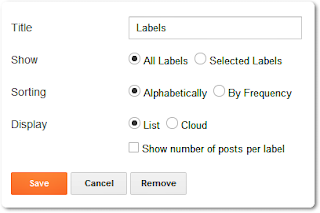
- Its Done, Check Your Blog Now. Enjoy :)
If you need our help then just leave your comments below, I am happy to help you. See you with more tutorials & tricks, Happy Blogging and Stay Blessed.

Author - Gagan Masoun is the owner of Blogs Daddy Blog.Gagan lives in India, has been blogging since 2010 and writing Blogs Daddy Blog since 2011.You can find him in the usual social networks.


This is very nice widget , the default blogger label system is pretty common. This is for sure a great update.
ReplyDeleteKsnWorld
Thanks for liking bro.
DeleteThanks bro its working
ReplyDeletehttp://mp3musicpod.blogspot.com/
visit to view
Yes, it is working :) and You are welcome @Qadeer
DeleteHey I am Gireesh of CoreBlogging.in.
ReplyDeleteI have made a list of Top 10 Blogging Widgets of 2012 and I have featured this widget from your blog on that list.
Check that post out and leave your comments at Top 10 Blogging Widgets of 2012
Thank you!
Hi Bro, I paste above code and saved the template accurate. But i have not get that beutiful label....can yu plz help me....
ReplyDeleteHave you followed all the steps carefully? or Are you using another label widget for your blog?
DeleteThumbs up, great job...
ReplyDeleteThank you so much @Yaakub Idris
Deleteitz not working
ReplyDeletei did not found
]]>
:(
Sagar, just edit your template and click inside editor anywhere and then find ]]> ....
Delete